Instagram Comment Sentiment Analysis: Turning Post Discussions into Market Insights

September 28, 2026

Instagram Comment Sentiment Analysis: Turning Post Discussions into Market Insights
On social media, vanity metrics can be deceiving. A viral Instagram Reel might generate 500,000 views and 20,000 likes, but what are people actually saying in the comments?
Are viewers laughing at an unintended error? Are they complaining about slow shipping? Or are they asking where they can purchase the item right now?
Comment sentiment analysis solves this problem by categorizing thousands of raw discussion rows into structured emotional and intent buckets. In this guide, we break down how social media managers, brand directors, and agencies evaluate comment sentiment to guide marketing strategy.
Why Likes and View Counts Lie
Likes take a fraction of a second to tap. A user can double-tap a post while scrolling mindlessly without ever reading your caption or engaging with your product.
Comments, on the other hand, require active cognitive effort. When an audience member leaves a comment, they are volunteering direct, unfiltered qualitative data:
- Product Feedback: Observations on sizing, quality, and design.
- Buying Intent: Clear purchase signals ("Is this available in Canada?", "What is the price?").
- Customer Frustration: Unresolved support tickets and delivery delays.
- Brand Advocacy: Word-of-mouth endorsements and recommendations to tagged friends.
Analyzing comment sentiment provides a realistic reflection of your brand health that raw view counts cannot match.
The Three Core Sentiment Buckets
When auditing an Instagram post or campaign, discussion text typically splits into three core categories:
1. Positive Sentiment & Product Praise
Comments expressing excitement, delight, or agreement.
- Examples: "Received mine yesterday and quality is top tier!", "Obsessed with this colorway."
- Metric Value: Validates creative direction and influencer alignment.
2. High-Intent Commercial Inquiries
Comments seeking transactional information. These represent active buying opportunities.
- Examples: "Do you ship to Europe?", "When is the restock dropping?", "Where is the link in bio?"
- Metric Value: Directly correlates with near-term revenue. These comments require fast replies from customer service teams.
3. Friction, Complaints & Spam
Negative reactions, shipping complaints, scam bot links, or hostile feedback.
- Examples: "Customer support has ignored my email for 10 days", "Scam alert: do not buy."
- Metric Value: Early warning indicator of PR crises or ad creative fatigue.
How to Conduct Instagram Sentiment Audits
Modern sentiment analysis combines automated text parsing with structured spreadsheet review:
Step 1: Export Complete Discussion Threads
To analyze sentiment, you need the full discussion dataset including nested replies. Use Analytics Social to paste the target post link and export the complete comment tree into CSV or Excel format.
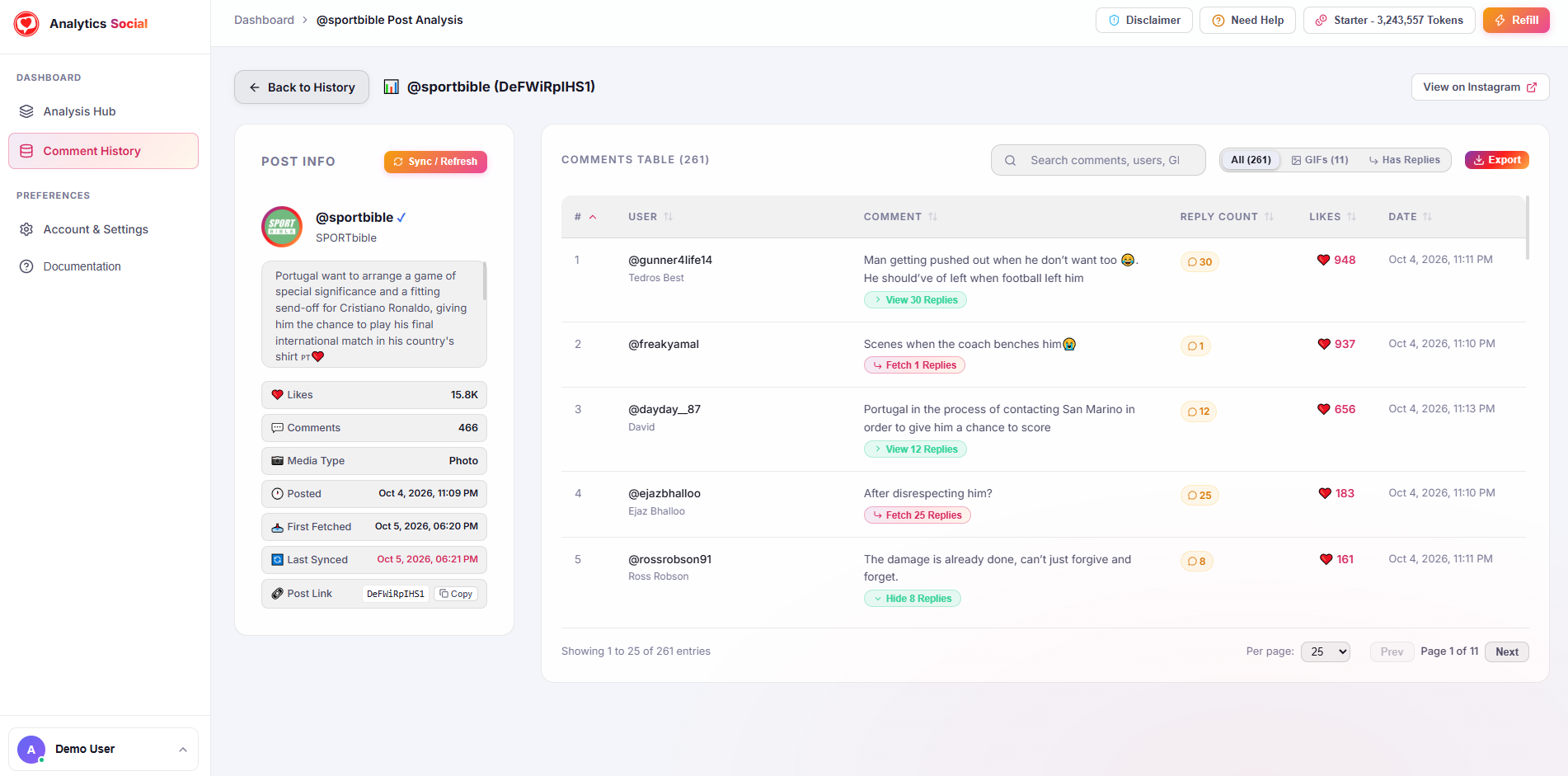
Unlike basic tools that miss multi-tier conversations, Analytics Social captures parent comments and nested replies alongside like counts and timestamps.
Step 2: Evaluate the Discussion Ratio
If 80% of comments consist solely of single emojis (such as fire emojis or hearts), the post was likely targeted by engagement pods or bot rings. If the GDR is above 65%, the audience is actively conversing about your content.
Step 3: Map Sentiment Trends Across Time
Track how sentiment evolves over a 30-day campaign:
- Launch Day: Expect high inquiry and initial reaction rates.
- Week 2: Look for customer receipt feedback ("Mine arrived today").
- Week 4: Check whether late comments show creative fatigue or unresolved delivery issues.
Building Client-Ready Reporting Decks
If you manage social media for clients, presenting raw comment counts in monthly reports is no longer enough. Add a dedicated Audience Sentiment Slide:
- Sentiment Breakdown Chart: A visual pie chart illustrating the ratio of Positive (68%), Inquiry (22%), and Friction (10%) comments.
- Top 5 Recurring Customer Questions: Extract the five most frequent product inquiries to help the client update their website FAQ.
- Voice of Customer Highlights: Quote the three most impactful organic testimonials from verified buyers.
Summary
Don't let vanity metrics mislead your marketing team. The true narrative of every campaign lives directly inside your Instagram comment section.
Start analyzing your audience feedback today. Paste any public post URL into Analytics Social to export and evaluate your comments in seconds.