How to Extract and Download Nested Instagram Comment Replies (Full Thread Extraction Guide)

October 2, 2026

How to Extract and Download Nested Instagram Comment Replies (Full Thread Extraction Guide)
When analyzing an Instagram discussion, the top-level comment is often only the opening remark. The most insightful conversations, sharpest criticisms, and deepest customer Q&A threads happen within nested replies.
Yet if you try to extract or read these replies through the Instagram web interface:
- Replies are hidden behind accordion links like "View 12 more replies".
- Clicking to expand replies frequently re-collapses them when new comments load.
- Most basic export utilities and browser plugins only capture top-level parent comments, discarding nested sub-threads completely.
In this technical walkthrough, we explain how Instagram structures reply trees and how to extract complete, multi-tier conversation threads into spreadsheets using Analytics Social.
The Data Structure of an Instagram Comment Thread
To understand why capturing replies is difficult, consider how Instagram organizes its public endpoints:
"Summer Collection Launch — Available Now in Stores & Online"
"Where can I buy this?"
"Available on our site! Link in bio."
"Do you have size 10 in stock?"
"Restocking on Friday at 9am EST!"
"Great video! 🔥"
In standard browser-based extraction, tools fetch only the first pagination cursor of parent comments. Capturing child replies requires recursive requests for each parent comment that contains a positive child_comment_count.
Executing hundreds of nested network requests from a personal IP address triggers aggressive rate-limiting or temporary IP bans from Meta edge firewalls.
Why Full Thread Extraction Matters
Discarding nested replies distorts your dataset in three major ways:
- Loss of Context: A parent comment might simply ask "Is this safe to use?" The answer and true customer consensus exist inside the five nested replies below it.
- Missing Customer Support Interactions: When a brand's social team responds to a customer complaint, that response is a child reply. Without child replies, your dataset reflects only complaints, missing resolutions.
- Underestimated Viral Debate: Controversy often concentrates under a single contentious parent comment that spawns 200 angry replies. If your tool only counts parent comments, that controversy is invisible.
How to Extract Complete Nested Threads with Analytics Social
Analytics Social uses dedicated distributed cloud runners that automatically follow pagination tokens for both top-level and nested discussions:
Step 1: Input the Post URL
Paste the URL of any public Reel or post into the Analytics Social input bar and click Analyse.
Step 2: Automatic Recursive Reply Fetching
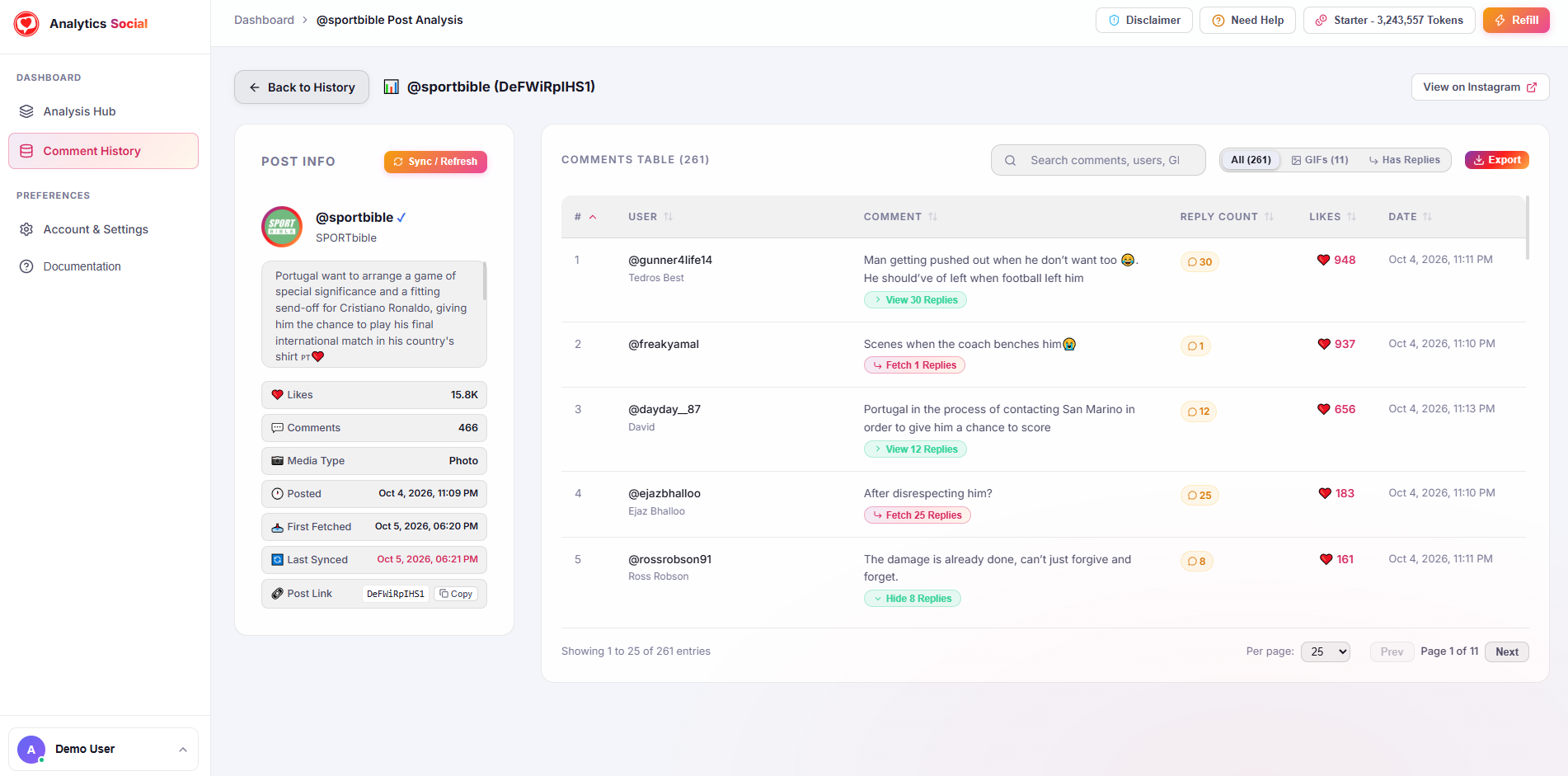
The platform automatically parses the child_comment_count for every parent row. In the dashboard table, you will see buttons such as Fetch 7 Replies or View 12 Replies. Clicking these dynamically reveals child rows with indentation, showing:
- Parent user handle
- Child reply user handle
- Timestamp of the reply
- Like counts on individual sub-comments
Step 3: Export Structured Relational Data
When you click Export and choose CSV or Excel:
- Each row represents an individual comment or reply.
- The
parent_comment_idcolumn clearly maps each reply back to its parent thread. - You can easily group or sort by parent ID in Excel to reconstruct complete conversation trees.
Spreadsheet Formula: Grouping Replies by Thread in Excel
Once your file is open in Excel:
- Select your table and go to Data > Sort.
- Set Sort by:
parent_comment_id(A to Z). - Add a level: Then by:
timestamp(Oldest to Newest).
This formula instantly organizes your spreadsheet so that every parent comment is immediately followed by its chronological replies, giving you a readable transcript of every discussion.
Summary
Never settle for truncated comment export tools that leave half the conversation behind. The most valuable consumer insights, brand defenses, and customer inquiries live directly within nested replies.
Extract complete, unclipped conversation trees today. Paste your target post URL into Analytics Social to download your full nested dataset in seconds.