How to Analyze Instagram Comment Datasets with ChatGPT & Claude (Step-by-Step Practical Guide)

October 5, 2026
How to Analyze Instagram Comment Datasets with ChatGPT & Claude (Step-by-Step Practical Guide)
Enterprise social listening tools like Brandwatch or Sprout Social cost between $500 and $2,000 per month. For solo founders, boutique agencies, and independent creators, these prices are out of reach.
Yet with modern language models like ChatGPT and Claude, you can perform qualitative customer sentiment research that rivals enterprise platforms for less than $20 a month.
All you need is a clean CSV export of your comment dataset and a structured set of analytical prompts.
In this guide, we walk through how to export comments using Analytics Social and run complete qualitative audits using ChatGPT or Claude.
Step 1: Export a Clean CSV Dataset
Before uploading data to an LLM, your dataset must be formatted cleanly with proper column headers.
- Find the target public post or competitor Reel on Instagram.
- Go to Analytics Social and paste the post URL.
- Click Analyse and let the cloud runner fetch the discussion tree.
- Click Export and select CSV (.csv).
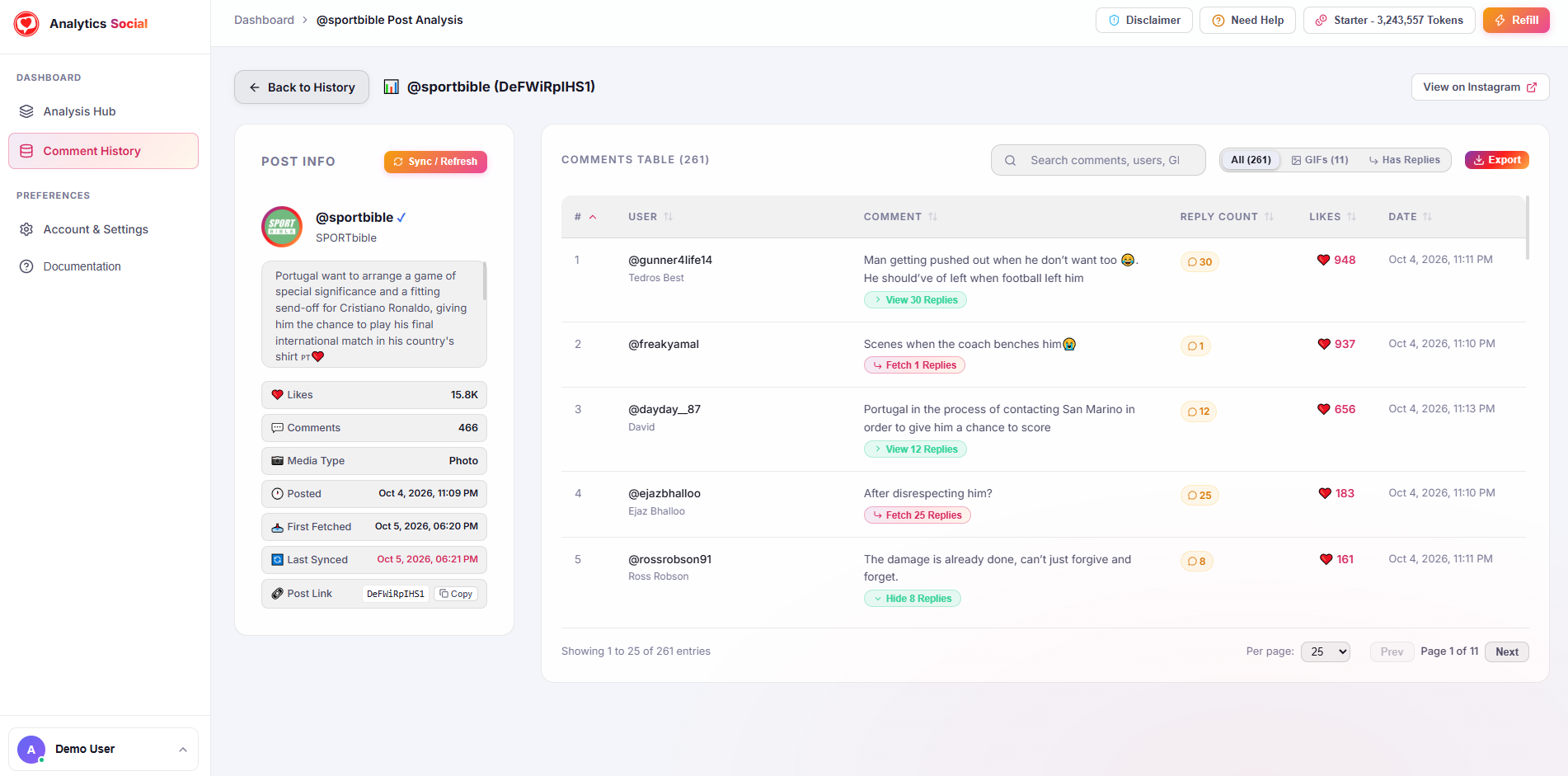
You now possess a clean file containing columns for username, comment_text, likes_count, reply_count, and timestamp.
Step 2: Upload the CSV to ChatGPT or Claude
Open your preferred conversational model:
- ChatGPT: Open ChatGPT and click the attachment icon to upload your
.csvfile. - Claude: Open Claude, attach the
.csvfile, or paste up to 500 rows directly into the prompt window.
Step 3: The Three Master Prompts for Comment Intelligence
Copy and paste these tested prompts into your session:
Prompt 1: Topic Modeling & Recurring Themes
"I have uploaded a CSV file containing comments from an Instagram campaign. Analyze the text column and identify the top 5 recurring themes or discussion topics. For each theme, provide: (1) A short descriptive title, (2) The approximate percentage of comments that belong to this theme, and (3) Three representative direct quotes from commenters."
Prompt 2: Customer Objections & Purchasing Friction
"Review all comments and filter specifically for customer objections, points of skepticism, and pricing complaints. What are the top 3 reasons people express hesitation about buying or using this product? Group these objections into a structured table with suggested counter-arguments that our marketing copy should address."
Prompt 3: Voice-of-Customer Ad Copy Extraction
"Extract the 10 most emotionally resonant positive phrases or descriptions used by commenters in this dataset. Convert these phrases into high-converting hooks for Instagram Reels, paid ad headlines, and email subject lines, preserving the natural vocabulary of the customers."
Step 4: Generating Visual Sentiment Reports
You can also ask the model to generate charts:
"Generate a summary breakdown table comparing positive praise vs product inquiries vs complaints. Then write clean Python matplotlib code to render a horizontal bar chart displaying the frequency of each category."
ChatGPT will execute the code and output a downloadable PNG chart ready to drop directly into your client presentation deck.
Before uploading spreadsheets to public AI models, ensure you remove private personal details. Analytics Social exports strictly public discussion text, keeping your workflow compliant with privacy norms.
Summary
You do not need expensive enterprise software subscriptions to uncover deep audience insights. By pairing the speed of Analytics Social with simple LLM prompts, you can turn any viral comment section into actionable marketing intelligence in minutes.
Ready to run your first analysis? Paste any public Instagram link into Analytics Social to download your CSV dataset and start discovering insights.